Real-time object detection in the browser
A web app that runs a YOLOv11n object detector directly in the browser. It takes the live webcam feed, finds objects in it and draws boxes around them. You can try it here.
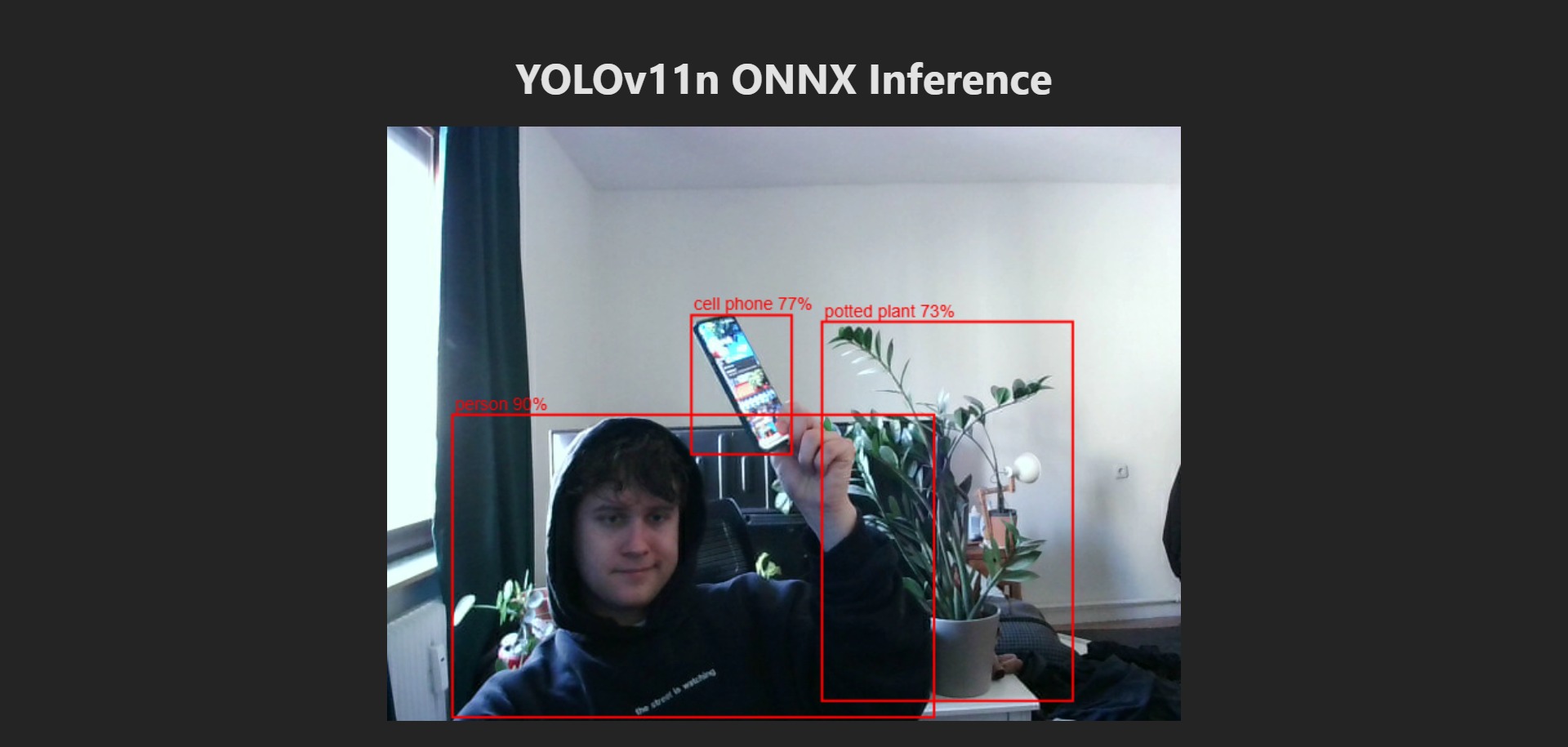 Fig. 1: Bounding boxes on the webcam feed
Why run it in the browser
Usually a camera feed goes to a server with a GPU and the results come back. Here the model is downloaded as a file, and everything after that happens on the visitor’s own device. That has two nice effects. No video ever leaves the device, and there is no inference server to run, so the whole app is just static files.
The price is that the model has to run on whatever hardware the visitor has. The app
therefore uses ONNX Runtime Web and tries three backends in order: WebGL, then WebGPU,
then WebAssembly. A small model helps too. yolo11n.onnx is about 10.6 MB and knows the
80 COCO classes. A dropdown also offers three fruit detectors, and the page shows how long
each pass takes on your machine.
From webcam frame to boxes
Every pass goes through the same steps:
- Letterbox. Scale the video frame to fit into the square the model expects, 640 × 640
for
yolo11n, and fill the rest with black. - Make a tensor. Turn the pixels into numbers between 0 and 1, in the shape
[1, 3, 640, 640]. - Run the model. ONNX Runtime Web takes the tensor and returns a table of detections.
- Decode and suppress duplicates. This happens inside the model file, see below.
- Filter. Skip every detection with a confidence below 0.5.
- Map back and draw. Convert the box from the square to video pixels and draw it on a canvas on top of the video.
Canvas pixels store red, green, blue and alpha for each pixel in turn. The model wants
three separate planes instead, all the red values first, then green, then blue. This is
the conversion from step 2, copied from letterbox():
const imgData = ctx.getImageData(0, 0, inputSize, inputSize).data;
const arr = new Float32Array(3 * inputSize * inputSize);
for (let i = 0; i < inputSize * inputSize; i++) {
  arr[i] = imgData[i * 4] / 255;
  arr[i + inputSize * inputSize] = imgData[i * 4 + 1] / 255;
  arr[i + 2 * inputSize * inputSize] = imgData[i * 4 + 2] / 255;
}
Drawing and detection run on separate schedules. Drawing follows the display with
requestAnimationFrame. Detection starts its next pass 40 ms after the last one has
finished. Until a new result is ready, the boxes stay where they were.
Squares and the way back
A webcam image is rarely square, but the model input is. Stretching the image would distort every object, so the code keeps the proportions and adds black bars instead. A frame of width and height is scaled by
and the padding is half of what is left over on each axis. The app asks for a camera of 1080 × 612 if available. That gives , an image height of 363 and black pixels above and below.
The model only ever sees the square, so its boxes are in the coordinates of the square too. To draw them on the video, the two operations are undone in reverse order:
The same holds for with . In the code this is one short expression, followed by the drawing:
const [x1, y1, x2, y2] = [0, 1, 2, 3].map(
  (j) => (data[off + j] - (j % 2 ? padY : padX)) / scale
);
const [w, h] = [x2 - x1, y2 - y1];

ctx.strokeRect(x1, y1, w, h);
The demo below shows both directions. The right side is what the model gets, the left side is what the camera delivered. The scene and the boxes are drawn by hand. Drag the slider to change the camera shape, and switch off the correction to see the boxes miss.
Where the duplicates go
A YOLO network does not output a neat list of objects. It predicts boxes on a grid, so one object usually gets several overlapping candidates. Non-maximum suppression (NMS) cleans this up: it keeps the most confident box and removes others that overlap it too much. The overlap is measured as intersection over union:
There is no NMS in the TypeScript code, though. The model was exported from Ultralytics
with nms=True, which bakes the grid decoding and NMS into the ONNX file itself. All four
model files contain a NonMaxSuppression node with an IoU threshold of 0.7. So the browser
receives finished rows of six numbers, the box corners , the confidence
and the class, and only has to filter and draw them.