2D raytracer
How do you draw a shadow? The surprising answer is that you don’t have to. If you draw the light instead, the shadow is what stays dark.
This small C++ program does exactly that. A sun sits in an 800 × 600 window with two circular obstacles. The sun sends out rays in all directions, and every ray stops at the first obstacle it touches. There is no line of code about shadows. You can drag all three circles with the mouse, and the rays are recomputed every frame, so the shadows follow right away.
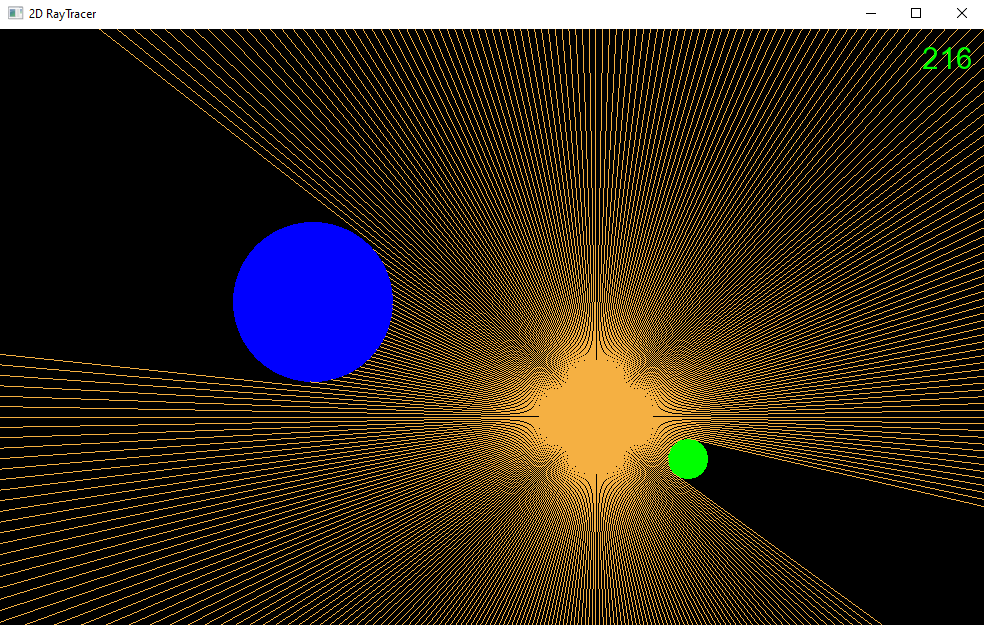 Fig. 1: The program running. Rays leave the orange sun and stop at the blue and green obstacles. The black areas behind them are simply places no ray reaches.
How it works
The sun sends out 360 rays, one per degree. Ray starts at the edge of the sun, which has centre and radius , and points in the direction
Because has length 1, adding it to a point moves that point exactly one pixel along the ray. That gives the whole algorithm: start at the edge of the sun, take one step, and check whether you are inside an obstacle. After steps the ray has reached
A point is inside a circle with centre and radius if its distance to the centre is less than . Comparing the squared distances does the same job without a square root:
The first step that passes this test ends the ray. If no step passes it, the ray runs out after 800 steps. Strictly speaking, this walking is called ray marching. A classic raytracer would compute the exact intersection point of ray and circle instead.
Here is that loop from updateRays(). stepIncrement works out to the direction vector
again, so each step has length 1:
sf::Vector2f direction(std::cos(radian), std::sin(radian));
sf::Vector2f rayEnd = circleCenter + direction * RAY_LENGTH;

float xStep = (rayEnd.x - circleCenter.x) / RAY_LENGTH;
float yStep = (rayEnd.y - circleCenter.y) / RAY_LENGTH;

sf::Vector2f stepIncrement = {xStep, yStep};
sf::Vector2f stepPosition = circleCenter + direction * m_sun.getRadius();

for (int j = 0; j < RAY_LENGTH; j++) {
  stepPosition += stepIncrement;

  if (isPointInCircle(stepPosition, m_obstacle.getPosition(), m_obstacle.getRadius()) ||
      isPointInCircle(stepPosition, m_obstacle2.getPosition(), m_obstacle2.getRadius())) {
    rayEnd = stepPosition;
    break;
  }
}
The same point-in-circle test also decides which circle the mouse has grabbed:
bool isPointInCircle(sf::Vector2f point, sf::Vector2f circlePosition, float radius) {
  float dx = point.x - circlePosition.x;
  float dy = point.y - circlePosition.y;
  return (dx * dx + dy * dy) < (radius * radius);
}
The approach is simple, and that has a price. In the worst case, when no ray hits anything, one frame takes steps, each with two circle tests.
Try it
This demo runs the same algorithm in your browser, with the same ray count, step size and circle sizes. It opens with a scene like the one in Fig. 1.